

Overview
Stormboard has been around since 2009, which makes it one of the oldest tools in this directory, and it grew up serving a different master than most whiteboards. While Miro and FigJam chased designers, Stormboard, built in Edmonton, Canada, chased the Fortune 500. The company claims more than half of the Fortune 50 use it, and the product decisions make sense once you know that.
The pitch is "data-first collaboration." Every sticky note is a database object, not a pixel on a canvas. That sounds abstract until the retro ends and you export the whole board as a formatted Word document, a PowerPoint deck, an Excel sheet with votes and comments, or raw CSV and JSON. No other tool in this directory comes close on reporting.
For retros specifically, two defaults stand out. Sticky notes hide their author unless the admin turns attribution on, and voting is anonymous to everyone except the admin. That is a stronger honesty posture than Miro or FigJam can offer, where anonymity is either partial or reversible.
Pros
- Sticky authorship is hidden by default, which no other whiteboard here does
- Report exports are unmatched: Word, PowerPoint, Excel, Google formats, CSV, JSON, XML
- StormAI covers grouping, summaries, and sentiment in one pass
- Two-way Jira and Azure DevOps sync with live-updating sticky notes
Cons
- Free plan caps Storms at 5 members, too small for most team retros
- The interface feels dated and busier than FigJam or Miro
- No guided facilitation, planning poker, or standups
- StormAI is gated: a 30-day trial on Business, admin-activated on Enterprise
Key Features
Anonymous by Default
"Show Idea Creator" ships set to Hide, and only the Storm administrator can change it. Combined with anonymous voting, that gives Stormboard the best out-of-the-box psychological safety of any general-purpose whiteboard we cover.
It is worth being precise about the limits: the admin can flip attribution on, so this is anonymity by policy rather than by architecture. Dedicated retro tools like Kollabe still go further. But among whiteboards, Stormboard wins this category.
StormAI
Stormboard launched StormAI in 2023, built on Azure OpenAI, and the April 2025 update brought it up to competitive strength. It groups related stickies by theme, summarizes selected content back onto the board, sorts cards by sentiment (positive, negative, neutral), generates ideas, and builds templates from a plain-language prompt.
The sentiment sort is the sleeper feature for retros. Run it after brainstorming and the frustrated cards separate themselves from the neutral ones before discussion starts.
StormAI access is the fine print to check. Business plans get a 30-day trial; on Enterprise it ships deactivated until an admin turns it on, free for the current term but potentially chargeable at renewal. Guests cannot use it at all.
Tasks and Reporting
Any sticky can become an assigned task with an owner, a due date, and a completion status, and the "Assigned Tasks" report collects them across the board. Between that and the export engine, Stormboard closes the loop most whiteboards leave open: retro ends, report goes to the team channel, action items land in Jira.
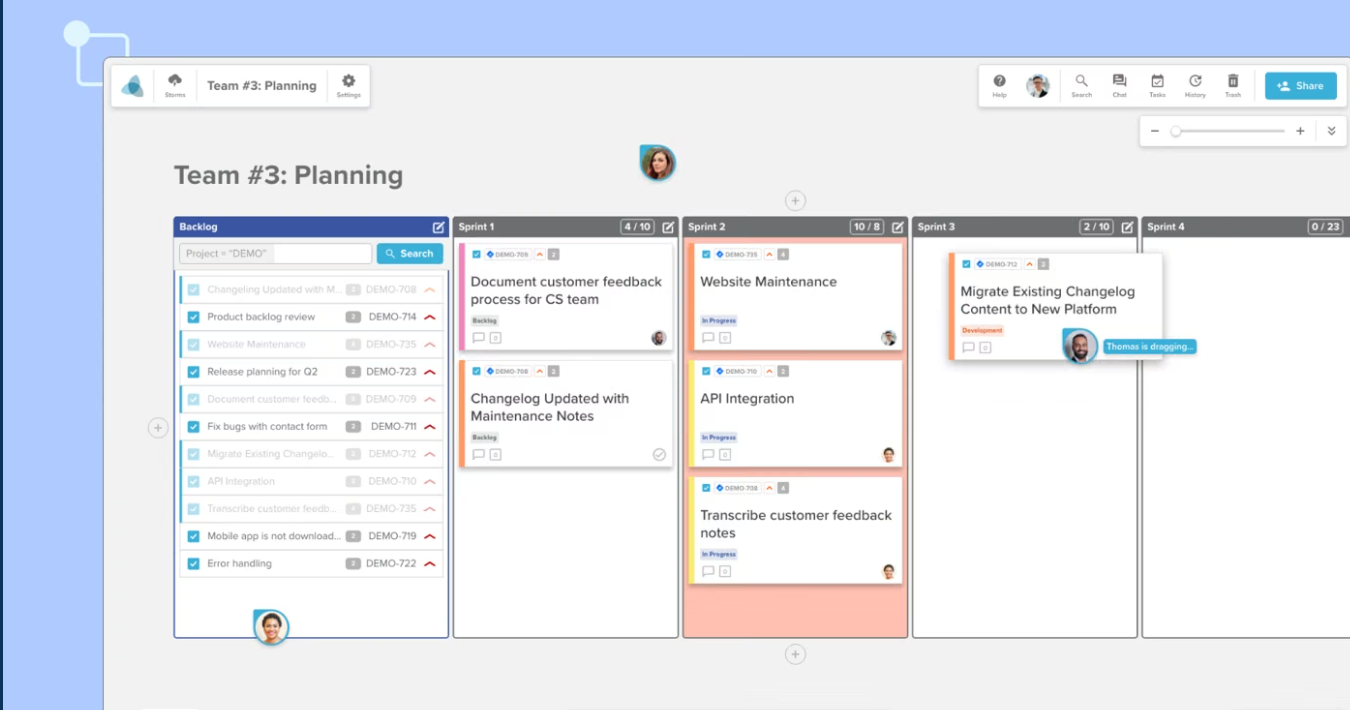
The Jira and Azure DevOps integrations are genuinely two-way. Query your backlog from inside the board, turn issues into live-synced stickies, push new stickies back as issues, even calculate sprint capacity. Rally and ServiceNow connect too, which tells you who the customers are.
Templates and the Canvas
The template gallery covers the retro standards: Start/Stop/Continue, Rose/Bud/Thorn, 4Ls, a six-section More/Less format, plus sprint planning and PI planning categories aimed at SAFe shops. Custom templates and section types come with Business plans, and StormAI can generate a format from a prompt.
The canvas itself does stickies, sections, drawing (with handwriting recognition on Windows and Surface Hub), embedded Office and Google docs, and a timer only admins can run. What it does not do is delight anyone. The UI has a workmanlike, early-2010s density that reviewers consistently flag, and there are no stamps, emotes, or music. If FigJam is a party, Stormboard is a meeting.
Pricing
- Personal (Free): Up to 5 members per Storm, 20MB storage. Core whiteboard, templates, voting, timer.
- Business ($10/user/month, or $99.96/user/year ≈ $8.33/month): Unlimited members, custom templates, full reporting and exports, multiple admins, 30-day StormAI trial.
- Enterprise (custom): Single-tenant hosting with a choice of data residency region (US, Canada, Ireland, Germany, UK, Japan, Singapore, Australia, and more), SSO, StormAI, custom-branded reports.
The 5-member cap on free Storms is the catch. A seven-person team cannot run a real retro without paying, so unlike EasyRetro or Neatro, there is no meaningful free tier for teams. At $8.33 to $10 per user, a ten-person team pays $83 to $100 a month, which is Miro Business territory and well above flat-rate tools like Kollabe at $29.
Ease of Use
Stormboard is not hard to learn, but it is not smooth either. The object-based model means stickies snap into sections rather than floating freely, which some facilitators love (structure for free) and whiteboard purists find rigid. First-time participants figure it out in a few minutes.
Facilitation controls are solid if manual: admins own the timer, voting rounds, anonymity toggle, and note locking. There is no phased retro wizard, so the facilitator drives the agenda themselves, same as every whiteboard here.
Where it genuinely shines is hardware breadth. Native Windows and Surface Hub apps with pen and handwriting recognition, iOS and Android companions, and browser support that scales from a phone to an 84-inch conference room screen. Hybrid teams with a big touchscreen in the room will find nothing else in this directory as comfortable.
Who Is It Best For?
Stormboard fits well for:
- Teams whose retro output must become a document: Word, PowerPoint, or Excel reports for stakeholders
- Jira or Azure DevOps shops that want stickies synced both directions
- Organizations with real compliance needs: SOC 2 Type II, SSO, single-tenant data residency in eleven-plus regions
- Hybrid teams running retros on a Surface Hub or big touchscreen
Look elsewhere if you need:
- A free tier that fits a whole team. The 5-member cap rules it out; try RetroTool or IdeaBoardz
- Guided facilitation with phases. TeamRetro or Retrium structure the meeting for you
- Planning poker or standups. Kollabe or Parabol bundle those
- A playful, high-energy canvas. That is FigJam's whole personality
The Verdict
Stormboard is the most underrated whiteboard in this directory for retrospectives specifically. Anonymous-by-default input, real task assignment, StormAI grouping and sentiment, and an export engine nothing else matches: that is most of a purpose-built retro tool's checklist, hiding inside an enterprise whiteboard.
The trade-offs are equally clear. It costs per-user money that flat-rate retro tools undercut, the free plan is a demo, the UI is dated, and it will never run your poker or standups.
If your retros end with "someone screenshot this," Stormboard will feel like a revelation. If they end with stickers and a laugh, buy something more fun.